

Introduction
A slow internet connection can be frustrating — especially when you are attending an important Zoom meeting, streaming your favorite show, or helping your children attend online classes. Many households in Dhaka and across Bangladesh experience slow broadband speeds without knowing the exact reason.
The good news is that improving your broadband speed does not always require changing your internet provider. Often, simple adjustments in router placement, device management, or network settings can make a big difference.
At SAM Online, we provide reliable high-speed broadband connections in Dhaka city and outside Dhaka, and we regularly help customers optimize their home networks for better performance. In this guide, we will show you proven methods to improve your broadband speed at home.

1. Test Your Current Internet Speed
Before making changes, check your actual internet speed using a reliable speed test tool.
Compare:
- Your subscribed plan speed
- Your actual download speed
- Your upload speed
- Your ping/latency
If your speed is significantly lower than what you are paying for, it may be time to upgrade your package or contact your provider.
👉 explore our high-speed broadband packages
If you are using an entry-level plan but have multiple users at home, upgrading to a higher-speed fiber package can instantly improve performance.
2. Place Your Router in the Right Location
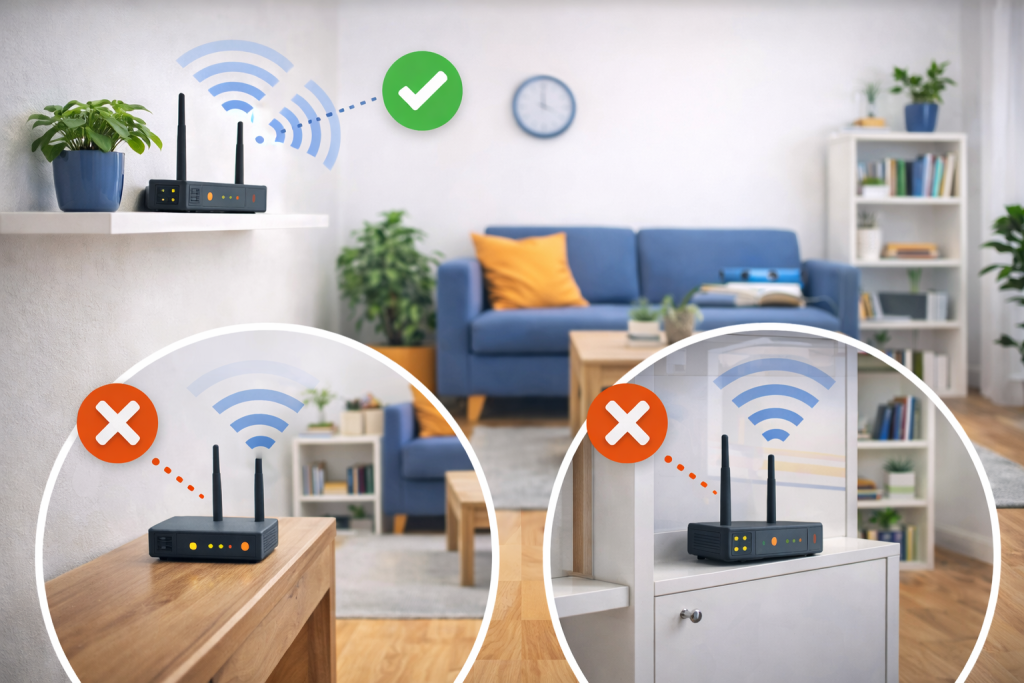
Router placement plays a crucial role in broadband performance.
Best practices for router placement:
- Place it in a central location in your home
- Keep it elevated (on a shelf or table)
- Avoid placing near thick concrete walls
- Keep away from metal objects
- Avoid microwaves and cordless phones
In many apartments in Dhaka, routers are placed inside cabinets or corners — which blocks signals and reduces coverage.
3. Upgrade to a Modern Router
If your router is more than 4–5 years old, it may not support high-speed fiber connections.
Consider upgrading to:
- Dual-band router (2.4GHz & 5GHz)
- WiFi 5 or WiFi 6 router
- Gigabit-supported router for fiber broadband
Old routers can limit speed even if your broadband plan is fast.
At SAM Online, we recommend modern routers for customers using our fiber connections in Bangladesh to ensure maximum performance.
4. Use the 5GHz Band for Faster Speeds
Most modern routers offer two frequency bands:
- 2.4GHz → Wider coverage, slower speed
- 5GHz → Faster speed, shorter range
For streaming, gaming, and video conferencing, connect your device to the 5GHz band for better performance.
5. Limit Background Downloads and Updates
Automatic updates, cloud backups, and background downloads can consume significant bandwidth without you noticing.
Common bandwidth-heavy activities include:
- Windows updates
- Mobile app updates
- Cloud storage syncing
- CCTV live streaming
Pause or schedule heavy downloads during non-peak hours.
6. Use Wired Connections for Important Devices
For devices that require stable performance — such as:
- Desktop computers
- Gaming consoles
- Smart TVs
- Office workstations
Use Ethernet cables instead of WiFi.
Wired connections provide:
- Lower latency
- More stable speed
- Better gaming performance
- Reduced signal interference
Fiber broadband combined with wired setup ensures the best possible experience.
7. Secure Your WiFi Network
If your WiFi password is weak or shared widely, unauthorized users may consume your bandwidth.
To secure your network:
- Use strong, unique passwords
- Enable WPA3 or WPA2 encryption
- Disable WPS if not necessary
- Change default router login credentials
A secure network not only protects your data but also improves speed by preventing unauthorized usage.
8. Restart Your Router Regularly
Sometimes, simply restarting your router can solve temporary issues.
Restarting helps:
- Clear memory cache
- Refresh IP connection
- Fix minor software glitches
Try restarting your router every 1–2 weeks for optimal performance.
9. Upgrade to Fiber Broadband for Maximum Speed
If you are still using older DSL or unstable cable connections, switching to fiber broadband can significantly improve your internet experience.
Fiber broadband offers:
- Higher and consistent speeds
- Low latency
- Better performance during peak hours
- Support for multiple devices
At SAM Online, we provide reliable fiber broadband connections in Dhaka city and outside Dhaka, ensuring uninterrupted connectivity for both homes and businesses.
👉 Get connected with SAM Online today
10. Use WiFi Extenders or Mesh Systems for Larger Homes
If you live in a large apartment or multi-story house, WiFi signals may not reach all rooms properly.
Solutions include:
- WiFi extenders
- Mesh WiFi systems
- Additional access points
These devices help eliminate dead zones and ensure stable coverage throughout your home.
Broadband Speed for Businesses
For small businesses and home offices in Bangladesh, a stable internet is essential.
- Cloud-based software
- Online transactions
- Video conferencing
- Security monitoring
If your business depends heavily on the internet, investing in a high-speed fiber connection is the best long-term solution.
👉 business broadband solutions in Bangladesh
Why Choose SAM Online?
SAM Online is committed to providing:
- High-speed fiber broadband
- Stable and uninterrupted connectivity
- Service coverage in Dhaka and outside Dhaka
- Professional installation support
- Responsive customer service
We understand the digital needs of modern families and businesses in Bangladesh. Our goal is to deliver reliable and future-ready internet solutions.


